Before You Start
These days there are many different tools to help with the literature searching process! Many of these tools produce visualization graphs to help you find literature related to a key paper, or certain key words.
They can be very powerful and helpful, but it's important that you have a good grasp on manual literature searching and techniques such as citation searching before using these tools. Many of them use citation searching, or a more advanced topic called bibliometric coupling to suggest papers, and it is up to you to understand the results as well as think critically about what is most relevant to your literature review.
When you begin using any of the below tools, it will ask you to input a paper title, DOI, or keywords. The tool will build a chart around this paper (often called a seed paper) through various techniques. Using citation searching, the tool can look at which papers have been referenced by your seed paper, and which cite it. Some tools also use a technique called bibliometric coupling to suggest papers that are not directly referenced by or citing your seed paper. Bibliometric coupling works by looking at the overlap in references of two papers. If there is a large overlap, meaning that the two different papers while not citing each other, cite a lot of the same literature, this suggests the papers might have similar topics.
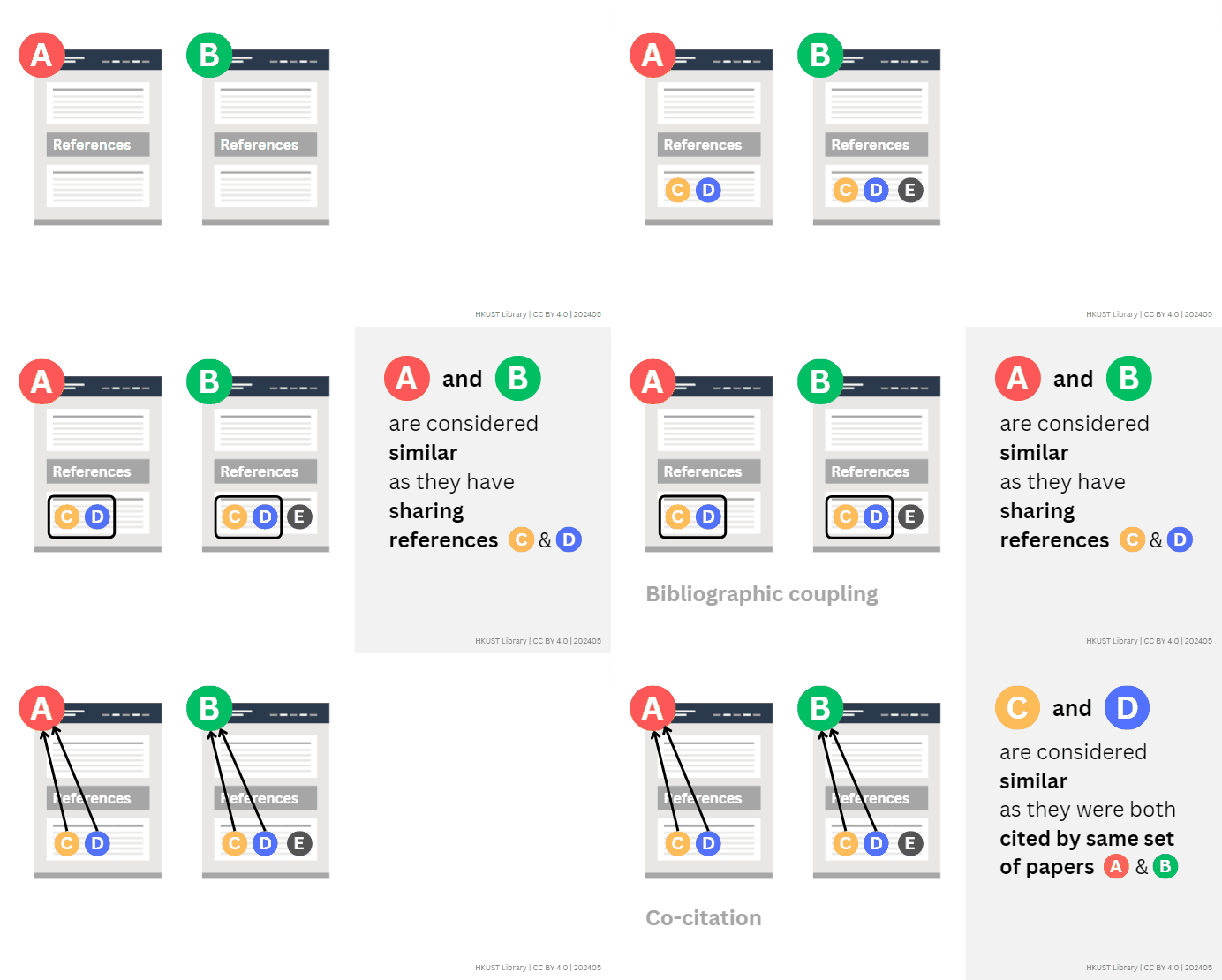
GIF Image: Bibliographic Coupling and Co-Citation by HKUST Library
Litmaps is one tool that has a good user interface and provides an obvious directionality in the graph with arrows. This means that it's easy to see which papers your seed paper has referenced, and which papers cite your seed paper, on a timeline! Litmaps creates a citation network as well as a co-citation network, meaning that the papers it shows you can be directly cited to or referenced by your seed paper, but they don't HAVE to be. They could be papers which are connected (cited to or reference by) to many of the same papers as linked to your seed paper, which is why they show up on the visualization.
You can use Litmaps without having an account but creating a free account unlocks a lot of key features.
Litmaps has a lot of different functionalities and lets you:
There is a lot of documentation about this tool, and the Litmaps Guidance provides answers to commonly asked questions as well as more information about how it works!
Inciteful Citation Atlas is another such tool. This one is completely free and requires no account for full functionality! Inciteful has two tools: Paper Discovery and Literature Connector.
Paper Discovery:
Literature Connector:
Inciteful has a lot of documentation including a Quick Start Guide to help you use this tool and understand the underlying methodology.
Connected Papers is not a direct citation or reference graph at all, and instead shows similar papers based off of bibliometric coupling and co-citations! Connected Papers starts with a seed paper like the other two tools, and creates a graph showing the papers its algorithm thinks are similar to your seed paper. Without making an account you can make up to 2 graphs a month, and with a free account you can make 5! Paid tiers offer unlimited graphs.
Connected Papers website layout has three panels showing:
For more information see the Connected Papers Documentation!
